Your phone is dead, or it's in another room, and a login screen is waiting on a 6-digit code. Or you're a developer writing integration tests against a service that requires 2FA, and you don't want to unlock your phone forty times a day to babysit a test suite. Either way, you need a TOTP code without touching an app store.
This post explains what a TOTP code actually is (an HMAC over a timestamp, not "magic 2FA"), what's packed into the otpauth:// link every authenticator app scans, when a browser-based generator is legitimate versus a bad idea, and how to use orangebot.ai's 2FA Authenticator — including the one place it talks to a third-party server, which most "free 2FA tool" writeups won't tell you.
How TOTP Actually Works
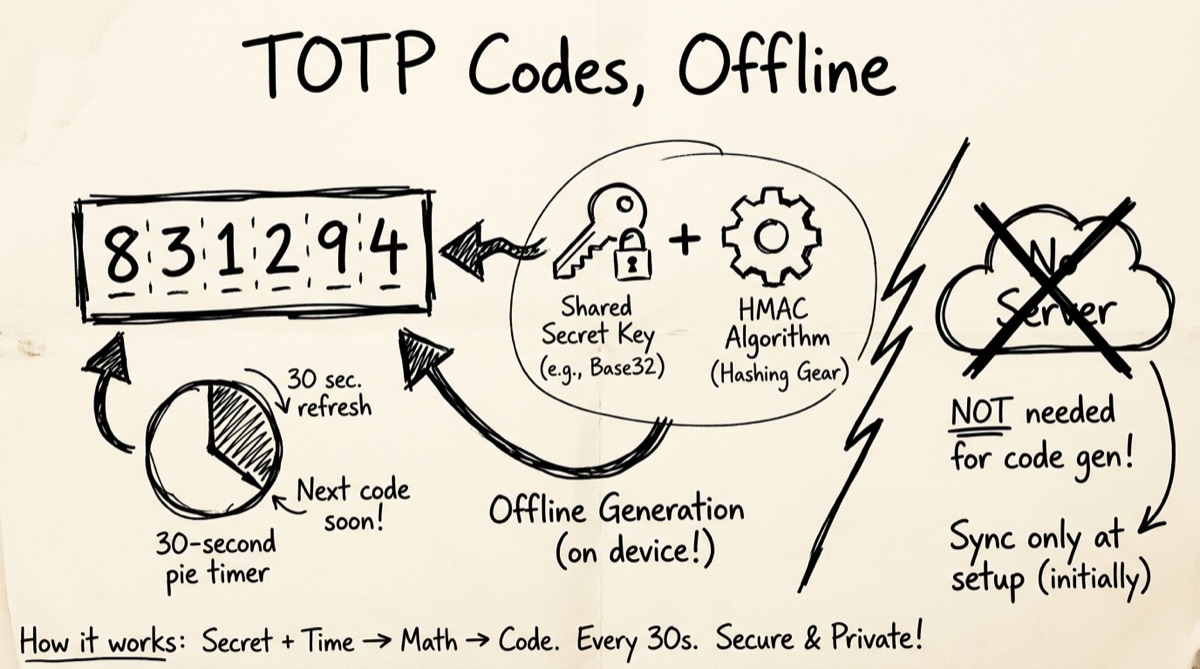
TOTP stands for Time-based One-Time Password, defined in RFC 6238 — small, elegant cryptography that explains why codes work offline with no network call at all:
- A shared secret is generated once. When you enable 2FA on GitHub, AWS, or any service, the server generates a random secret — usually 16 to 32 characters, encoded in Base32 (the alphabet
A-Z2-7, chosen for case-insensitivity and no ambiguous characters like0/O). The server keeps a copy; you get a copy, as raw text or embedded in a QR code. - Time becomes a counter. Both sides take the current Unix timestamp, divide by the step size (almost always 30 seconds), and floor it — a counter that increments every 30 seconds and matches on both ends as long as the clocks roughly agree.
- HMAC does the work. The secret and counter feed into HMAC-SHA1 (the RFC 6238 default; SHA-256/512 exist but are rare in practice), producing a 20-byte digest.
- Dynamic truncation picks 6 digits. The digest's last nibble selects an offset; 4 bytes from there are read as a 31-bit integer, reduced mod 1,000,000 into a zero-padded 6-digit code.
That's the entire algorithm. No network round-trip, no server ping, no "check with Google" step — which is exactly why your authenticator app works in airplane mode. Both sides only need the same secret and roughly the same clock. This is also why TOTP fails when your device clock drifts: even 40–60 seconds of drift shifts the counter into a different 30-second window and the code no longer matches — the single most common "why doesn't my code work" support ticket in any auth system. Most verifiers tolerate this by also accepting the previous and next window (±1 step) rather than just the current one.
What's Inside an otpauth:// URI
When a service shows you a QR code for 2FA setup, it's encoding a URI in this shape:
otpauth://totp/Issuer:[email protected]?secret=JBSWY3DPEHPK3PXP&issuer=Issuer&algorithm=SHA1&digits=6&period=30
Every field matters:
totpvshotp— tells the app whether this is time-based (TOTP) or counter-based (HOTP, which increments on each use instead of each time step; rare today, mostly legacy hardware tokens).Issuer:account— the label shown in your authenticator app's list. Display-only, not used in the cryptography.secret— the Base32-encoded shared secret. The only value that actually matters for generating correct codes; everything else has sane defaults.issuer— a duplicate of the label's issuer, used by some apps to show a logo or group codes.algorithm/digits/period—SHA1,6, and30by default. A few services useSHA256/SHA512, 8 digits, or a 60-second period.
A QR code is just this URI rendered as a scannable image — nothing more. If you can read the URI, or the raw Base32 secret next to it (every legitimate 2FA setup screen shows one as a manual-entry fallback), you have everything needed to generate valid codes without scanning anything.
Legitimate Uses for a Browser TOTP Tool
A client-side TOTP generator is a real tool with real, non-shady uses:
- You lost or don't have your phone. Backup access using a secret you saved when you first set up 2FA.
- Local development and QA. Generate valid codes during automated or manual testing without unlocking a physical device each time — the most common legitimate use of a browser TOTP tool.
- Verifying your own TOTP implementation. A transparent, inspectable browser tool is a fast way to cross-check your server-side code generation.
- Understanding the standard. Watching a code regenerate every 30 seconds makes RFC 6238 concrete in a way reading the spec text doesn't.
None of this replaces your phone's authenticator app as your daily driver for real accounts.
The Honest Security Section: When Not to Paste a Real Secret
Here's the part most "best online 2FA generator" articles skip entirely.
A TOTP secret is not a password you can rotate casually — it's a long-lived cryptographic key. Possessing it is functionally equivalent to possessing your 2FA factor for that account: anyone who has it can generate valid codes indefinitely, with no rate limit and no notification to you.
Never paste a production account's real secret into any web page — including a genuinely client-side one — unless you can verify it never leaves the tab. Why:
- You can't audit every load. A tool that runs entirely in JavaScript is served fresh on every visit. A single compromised dependency on a future deploy could silently start exfiltrating input — "client-side" today isn't a permanent guarantee.
- Browser tabs are a bigger attack surface than a dedicated app. Malicious extensions, XSS on a neighboring tab, or a compromised session can read clipboard contents or
localStoragein ways a sandboxed native authenticator app generally can't be touched by. localStorageis not encrypted at rest. A secret persisted for convenience sits in plaintext on disk, readable by malware, another user on a shared machine, or anyone with a stolen, unencrypted laptop.- QR rendering can itself be a leak point. If a tool draws your QR code via an external image-generation API instead of rendering it locally, the encoded data — your
otpauth://URI, secret included — has to be sent to that third party's server. That's a real network call carrying a real secret, even though code generation itself stays local. Check what a "QR preview" feature actually does before trusting it.
The practical rule: use a dedicated authenticator app (Google Authenticator, Authy, 1Password, Bitwarden, Aegis, Ente Auth) as your primary 2FA for real accounts, and reserve a browser tool for the legitimate uses above.
How to Use OrangeBot's 2FA Authenticator
orangebot.ai/tools/2fa-auth is a single-secret TOTP generator and verifier that runs the algorithm above using the browser's native Web Crypto API (crypto.subtle, HMAC-SHA1) — no server round-trip for code generation.
- Enter or generate a secret. Paste an existing Base32 secret into the Secret field, or click "Generate Secret" for a fresh random 20-byte secret — useful for a demo or dev environment.
- Set the issuer and account name. These build the label inside the
otpauth://URI. Cosmetic only — they don't affect the generated code. - Watch the live code. A 6-digit code (SHA-1, 30-second period) refreshes automatically with a visible countdown.
- Copy the secret or the full
otpauth://URI. Copy Secret grabs the raw Base32 key; Copy OTP URL grabs the URI you'd otherwise get from scanning a QR code — handy for importing into a real authenticator app without a phone camera. - Preview the QR code if you need it — knowing what that does. "Show QR" renders the URI as a scannable image via a third-party QR-image API, which means the URI (secret included) is sent to that service. Skip it, or use only a disposable test secret, if you're sensitive about where data travels.
- Verify a code. Paste a 6-digit code into the Verify panel; it checks the current window plus one step in each direction (90-second tolerance), mirroring how real servers absorb clock drift. Successful verifications land in a small history list in
localStorage, with a one-click Clear button.
Nothing here requires an account, and the code math works with your Wi-Fi off — the only outbound call in the entire tool is the QR-image request described above, and it only fires if you open the QR panel.
Browser TOTP Tools: An Honest Comparison
A handful of TOTP tools exist, and they're not identical:
- 2FA Pro and 2fa.cn — server-processed generators for consumer convenience across many services (Google, Facebook, Binance, Discord). Both claim secrets aren't stored server-side, but the trust model still runs through a server request rather than staying purely in the tab.
- Authgear's TOTP Authenticator — closest in spirit to orangebot's tool: fully client-side, developer-focused, with configurable algorithm (SHA-1/256/512) and digit length (6/8) for services that deviate from the defaults.
- totp.app and totp.danhersam.com — minimalist, browser-memory-only generators with no server component, but no built-in verify-and-history workflow.
- stefansundin's 2FA QR Code Generator — generates and decodes QR codes back into secrets, entirely client-side, with an offline-installable mode.
- randomkeygen.com — generates fresh Base32 secrets but doesn't compute live codes; complementary rather than a competitor.
The differentiator that actually matters, more than feature lists, is whether the tool tells you the truth about where your data goes — including edge cases like QR rendering — rather than just asserting "100% private" and leaving you to verify it yourself.
FAQ
Is a browser-based TOTP generator as secure as Google Authenticator?
For testing, development, and emergency backup, yes — the underlying algorithm is identical (both implement RFC 6238). For primary 2FA on real accounts, no: a dedicated app sandboxes the secret inside OS-level app storage, away from browser extensions and other tabs. Use the browser tool for dev/test/backup, not as your daily driver.
Why do TOTP codes work without internet access?
Because nothing is fetched from a server at generation time. Your device and the server independently compute the same HMAC over the same shared secret and the same time-derived counter. As long as your clock is roughly accurate, the codes match with zero network calls.
What happens if my code doesn't match the server's?
Almost always clock drift. If your device clock is off by more than the server's tolerance window (commonly ±30–90 seconds), your code will be rejected even though the secret is correct. Sync your system clock and try again.
Can I use this tool to store my real 2FA secrets long-term?
You technically can — verified codes persist in localStorage until cleared — but it isn't the recommended use case. Browser storage isn't encrypted at rest, and a tab is a larger, less-audited attack surface than a dedicated authenticator app or a password manager's TOTP vault (1Password and Bitwarden both support storing TOTP secrets encrypted). Use orangebot's 2FA tool for test/dev secrets and short-term needs, not permanent storage.
What's the difference between TOTP and HOTP?
TOTP derives its counter from the current time divided into fixed steps, usually 30 seconds — what almost every modern 2FA setup uses. HOTP (HMAC-based One-Time Password) instead increments a counter each time a code is generated or used, requiring server and client to stay in sync on usage count rather than time. HOTP shows up mostly in older hardware tokens; TOTP dominates because it self-syncs without tracking state across uses.
For more privacy-first browser tools — encoding, passwords, and beyond — see how strong passwords actually work, Base64 encoding explained, or browse the full orangebot.ai tools directory.