You paste a JWT into a debugger, or drop an image into a CSS file as a data: URI, or kubectl get secret -o yaml and see a wall of letters and numbers ending in =. That's Base64. It's one of the most common encodings in software, and also one of the most misunderstood — plenty of developers treat it as a lightweight form of encryption, which it isn't, and that misunderstanding occasionally leaks a secret.
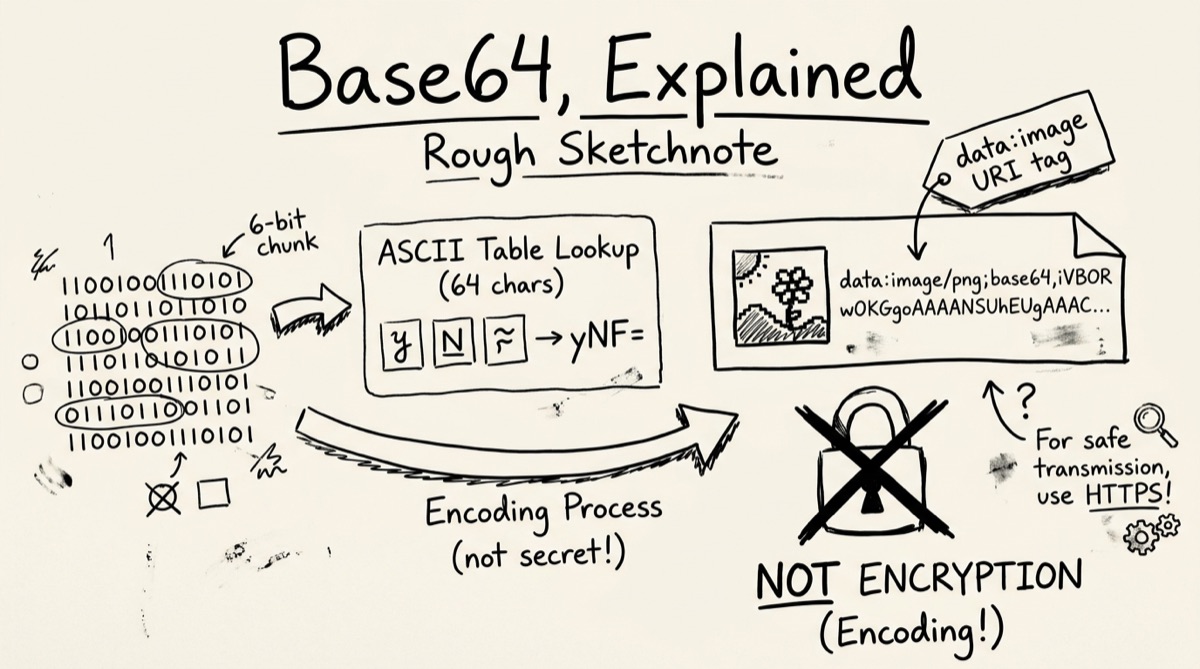
How Base64 Actually Works
Base64 exists because a lot of systems — email headers, JSON, URLs, XML — are built to carry text, specifically a narrow set of printable ASCII characters. Binary data (an image, a compiled file, a cryptographic key) has bytes that don't map cleanly onto that alphabet. Base64 is the bridge: it re-encodes arbitrary bytes into a string made up of only 64 safe characters.
The mechanism is fixed-width regrouping, not compression or math tricks:
- Take the input 3 bytes (24 bits) at a time.
- Split those 24 bits into four 6-bit chunks.
- Each 6-bit chunk is a number from 0–63. Map it to a character in the Base64 alphabet:
A–Z,a–z,0–9,+,/— 64 characters, hence the name. - Four 6-bit chunks become four output characters. Three input bytes always become exactly four output characters.
That 3-bytes-in, 4-characters-out ratio is why Base64 has a fixed, predictable overhead: every encoded string is about 33% larger than the original binary. A 3 MB file becomes roughly 4 MB of Base64 text. There's no way around this — it's baked into the 6-bit/8-bit mismatch, not an implementation inefficiency. If you're embedding a lot of binary data as Base64 (in JSON, in a data: URI, in an env var), budget for the size tax.
Padding. Input isn't always a clean multiple of 3 bytes. One leftover byte at the end pads the output with ==; two leftover bytes pad with a single =. That trailing = or == isn't part of the data — it's a marker telling the decoder how many of the last group's bits are real.
The URL-safe variant. Standard Base64's + and / characters both have special meaning in URLs and filenames (+ means space in query strings, / is a path separator). So RFC 4648 defines a URL-safe alphabet that swaps + → - and / → _, and conventionally drops the = padding entirely since the decoder can usually infer it from length. This is the variant JWTs and most modern web tokens use — if you've ever tried to decode a token with a standard Base64 tool and gotten garbage or an error, this substitution is almost always why.
Where Developers Hit Base64 Every Day
- Data URIs.
data:image/png;base64,iVBORw0KGgo...embeds an image directly in HTML or CSS, avoiding a separate HTTP request. Good for small icons and sprites; bad for large images, since you pay the 33% tax on every page load with no caching benefit. - JWTs. A JSON Web Token is three Base64URL segments joined by dots: header, payload, signature. Anyone can decode the header and payload — that's the point, they're meant to be readable. Only the signature (HMAC or RSA, usually) needs a secret key to forge.
- HTTP Basic Auth. The
Authorization: Basic <token>header is justbase64(username:password). Not hashed, not salted, not encrypted — Base64. Intercept that header over plaintext HTTP and you have working credentials in about one second. - Email attachments (MIME). Binary attachments are Base64-encoded per RFC 2045, historically wrapped at 76 characters per line — a holdover from mail transfer agents that weren't 8-bit clean.
- Env secrets and Kubernetes.
kubectl get secret my-secret -o jsonpath='{.data.password}' | base64 -dis enough to read a "secret" stored in a Kubernetes Secret object. Kubernetes Secrets are Base64-encoded, not encrypted, unless you've separately configured encryption at rest — a mismatch that trips up teams who assume "Secret" in the resource name implies cryptographic protection.
Base64 Is Not Encryption
This is worth saying plainly because it's the single most common misconception: Base64 has no key, no secret, and no security property at all. It's a reversible, deterministic transformation — anyone with the string and five seconds can decode it. Decoding a JWT payload to read its claims isn't "hacking" the token any more than reading a book's table of contents is hacking the book. The security of a JWT lives entirely in its signature, verified against a secret the client never sees — not in the fact that the payload looks like gibberish.
The practical danger is what this misconception leads people to do: paste an API key, a password, or a signed token into a random online "Base64 decoder" to check its contents. If that tool processes input on a server — and most of the ones dominating search results do — you've just sent a live credential to a third party over the network for no reason. If the string was sensitive before you pasted it, it's still sensitive after you decode it. Treat any Base64 blob from an auth header, a signed token, or a .env file the same way you'd treat the plaintext secret inside it.
How to Encode or Decode Base64 with OrangeBot
orangebot.ai/tools/base64-tool runs entirely in your browser — nothing is uploaded, which matters given the point above.
- Open the base64 tool and pick a mode. Tabs at the top switch between Encode and Decode.
- To encode: paste text into the input box and click Encode, or drag any file — image, PDF, binary, whatever — onto the drop zone below it. Text input handles UTF-8 correctly (emoji, accented characters, CJK text all round-trip cleanly), and dropping a file reads it with
FileReaderand produces the Base64 payload directly, no manual conversion. - To decode: paste a Base64 string and click Decode. If you paste a full
data:image/png;base64,...URI, the tool automatically strips the prefix before decoding — you don't need to trim it yourself. - Image auto-detection. If the decoded bytes look like a PNG, JPEG, GIF, or WebP (checked by reading the file's magic bytes, not just trusting a
data:prefix), the tool renders an inline preview automatically — useful for eyeballing an image buried in an API response or a log line. - Copy the result. A Copy button grabs the plain Base64 string. If you dropped a file, a second "Copy Data URI" button gives you the full
data:<mimetype>;base64,<payload>string, ready to paste straight into an<img src>or a CSSbackground-image.
That's the full surface area — there's no account, no rate limit, and no server round-trip, so it works the same offline as it does online.
CLI Sidebar: base64, atob, and Unicode Gotchas
If you live in a terminal, both major platforms ship a base64 command, but the flags differ:
# macOS (BSD base64)
base64 -i file.txt -o file.b64      # encode
base64 -D -i file.b64 -o file.txt   # decode (capital -D)

# Linux (GNU coreutils)
base64 file.txt > file.b64          # encode
base64 -d file.b64 > file.txt       # decode (lowercase -d)
base64 -w 0 file.txt                # encode, no 76-char line wrap
The decode flag case (-D vs -d) is the gotcha that bites people copying a one-liner between a Mac and a Linux box.
The other classic gotcha is in the browser. JavaScript's built-in btoa() and atob() only handle Latin1 (single-byte) characters — pass btoa("café") or anything with an emoji and you get InvalidCharacterError: String contains an invalid character. The fix is the trick OrangeBot's own encoder uses internally: btoa(unescape(encodeURIComponent(str))) to encode, decodeURIComponent(escape(atob(str))) to decode. It works, but it's not obvious, and it's easy to ship code that silently mangles non-ASCII text because btoa "worked" on your test string.
Base64 Tools Compared
Most of the top results for "Base64 encode decode online" — base64decode.org, base64decode.net, freeformatter.com, and utilities-online.info — are server-processed: your input is submitted to their backend and a result comes back. Fine for a throwaway string; a bad idea for anything from a credential, cookie, or private token.
A smaller set, including coddy.tech and phcode.io, also process client-side and are reasonable alternatives if you just need plain text encode/decode. Where OrangeBot's base64 tool differs is the file handling: drag-and-drop conversion of arbitrary files straight to a copyable data URI, plus automatic image detection on decode — useful if you're regularly moving between "I have a file" and "I have a data URI" rather than just round-tripping short strings.
For anything touching a real secret — an API key, an auth header, a signed token — the rule from the PDF compressor guide applies just as well here: verify a tool is genuinely client-side by opening DevTools' Network panel, turning off Wi-Fi, and trying it. If it still works offline, nothing left your machine.
FAQ
Is decoding a JWT the same as hacking it?
No. JWT payloads are meant to be human-readable — decoding one just reads the claims, the same as opening a zip file isn't "hacking" the zip. The token's actual security comes from its signature, which you can't forge without the signing key.
Why does btoa() throw an error on my string?
btoa() only supports Latin1 characters. Any text with emoji, CJK characters, or accented letters outside that range throws InvalidCharacterError. Wrap it with encodeURIComponent/decodeURIComponent as shown in the CLI sidebar above, or use TextEncoder/TextDecoder with manual byte-to-string conversion.
What's the difference between Base64 and Base64URL?
Same algorithm, different alphabet for two characters: standard Base64 uses + and /; Base64URL replaces them with - and _ so the output is safe to drop directly into a URL or filename without escaping. JWTs and most modern tokens use Base64URL.
Is there a file size limit on the OrangeBot tool?
No hard limit, but it's browser memory-bound. Files up to roughly 50 MB encode smoothly; remember the output string is about 33% larger than the input, so a 50 MB file produces a ~67 MB Base64 string sitting in browser memory.
Can Base64 compress data?
No — it does the opposite. Base64 always increases size by roughly a third. It's an encoding format for text-safety, not a compression scheme. If you need both, compress first, then encode the compressed bytes.
Why do so many JSON tokens start with "eyJ"?
Because {" — the start of nearly every JSON object — happens to Base64-encode to eyJ. It's not a special marker, just an artifact of how the character-to-6-bit mapping lines up with common JSON syntax.
For related browser-based utilities: validate and diff structured data with orangebot's JSON formatter, generate one-time codes with the in-browser TOTP authenticator, or browse the full tools directory for more client-side, no-upload utilities.