"Use a strong password" is the most repeated, least explained piece of security advice on the internet. Strong compared to what? Measured how? Most people's mental model is "add a symbol and a number," which stopped mattering to attackers around 2010. This guide explains what actually makes a password hard to guess, with real numbers instead of a green progress bar telling you to trust it.
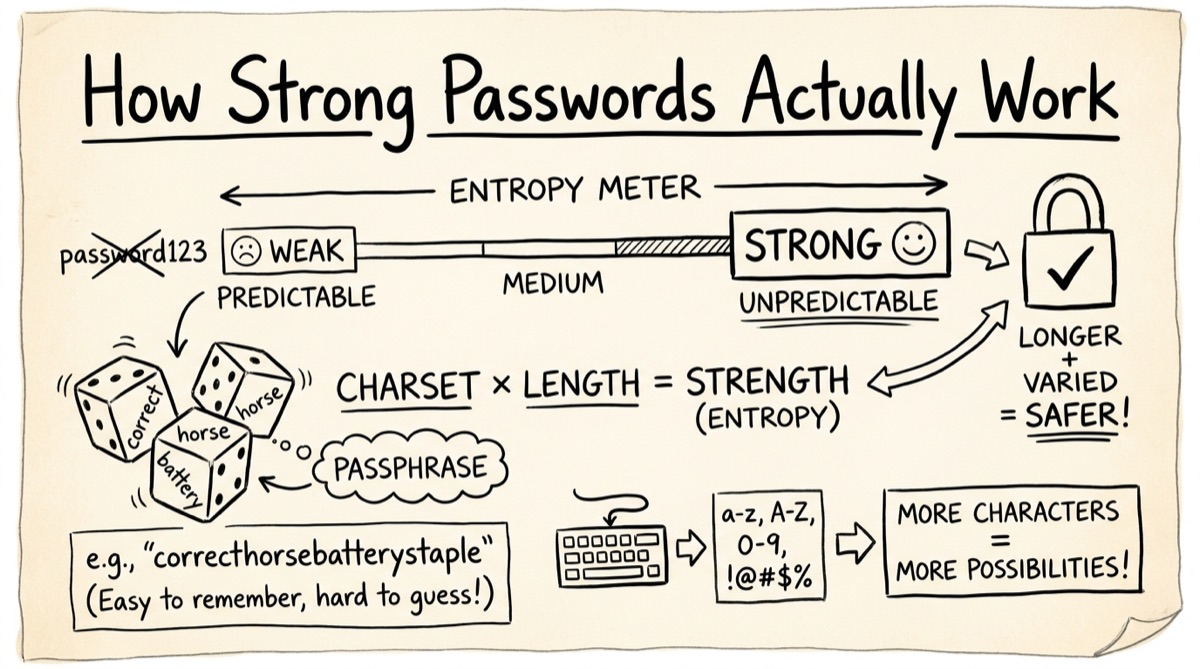
Entropy, in Plain Terms
Entropy counts how many equally-likely passwords your generation method could have produced. It's not a property of the string itself — Tr0ub4dor&3 looks complex, but if it came from a predictable "capitalize, add symbol, add digit" habit, an attacker who knows the habit only has to search a small space. Entropy measures the size of the search space, not the appearance of the result.
For a password built by picking characters uniformly at random from a pool of size N, for L characters, the formula is:
bits = log2(N ^ L) = L × log2(N)
Each bit doubles the number of guesses an attacker needs on average. A password with 40 bits of entropy takes 2^40 guesses to exhaust; 41 bits takes twice as long. This is why small length changes matter more than adding a symbol: going from 12 to 16 characters in a 62-character pool adds about 23.8 bits, while swapping one letter for a symbol adds maybe 0.3 bits.
Roughly, here's where common thresholds land (these are the same buckets orangebot's password generator uses for its own strength meter):
- Under 28 bits — crackable in seconds to minutes on ordinary hardware.
- 28–35 bits — crackable in minutes to hours against a dedicated attacker.
- 36–59 bits — resists casual attacks, but a GPU rig or leaked-hash cracking rental can still get through it.
- 60–79 bits — the range most current guidance calls "strong" for an account password.
- 80+ bits — effectively unguessable for a login; this range is really for master passwords, encryption keys, and long-lived secrets.
For a well-known reference point: a 4-word Diceware passphrase drawn from EFF's 7,776-word list has log2(7776) ≈ 12.9 bits per word, so four words ≈ 51.7 bits — solidly in the "reasonable, not quite strong" range on its own, which is why Diceware guides usually recommend 5–6 words for anything important.
Random Passwords vs. Passphrases
This is the xkcd 936 argument, and it still holds up: correct horse battery staple beats Tr0ub4dor&3 because entropy comes from the number of independent random choices, not from visual complexity. Four words chosen uniformly from a large wordlist have more entropy than an 8-character password built from a "memorable" pattern, because human pattern-generation is wildly non-random — people substitute the same letters, capitalize the same position, append the same year.
The trade-off is real, though:
- Random character strings pack the most entropy per keystroke. A 16-character random password from a 90-character pool carries roughly 101 bits — more than a 10-word passphrase — but you can't type it from memory and mistyping one character breaks it.
- Passphrases trade density for memorability and typo-tolerance. Getting one word slightly wrong is obvious; getting one random character wrong in a 20-character string is not.
Rule of thumb: use random strings for anything a password manager will store and autofill. Use a passphrase for the handful of secrets you actually type by hand — your password manager's master password, disk encryption, a device PIN's big sibling.
Why crypto.getRandomValues Matters (and Math.random Doesn't)
Not all "random" is equal. Math.random() is a fast, non-cryptographic pseudorandom generator — its internal state can be reconstructed from a modest number of outputs in some engines, which is fine for a UI animation and unacceptable for a secret. crypto.getRandomValues(), the Web Crypto API, pulls from the operating system's cryptographically secure random number generator — the same source your browser uses for TLS session keys. That distinction is the entire security model of a password generator; everything else is UI.
There's a second, less-discussed pitfall: even CSPRNG output can be biased if you map it into a range carelessly. Taking crypto.getRandomValues() % poolSize skews toward lower values whenever poolSize doesn't evenly divide the generator's range — a subtle bug that quietly weakens every password it touches. The correct fix is rejection sampling: generate values, discard any that fall outside the largest multiple of poolSize below the generator's ceiling, and only accept ones that don't skew the distribution. orangebot.ai's password generator does exactly this — it's a small implementation detail, but it's the difference between "cryptographically random" as a marketing claim and as a fact you can verify by reading the source.
The Trust Problem With Online Generators
Here's the uncomfortable question nobody asks about the "free password generator" sites that rank on page one: how do you know the password it just showed you wasn't also sent to their server?
Some are genuinely client-side — the JavaScript runs in your browser and nothing crosses the network. Others generate server-side and serve you the result, which means your new password touched a third party's logs before you even used it once. Most generator sites don't document which model they use, and marketing copy that says "secure" doesn't tell you either.
The verification is simple and takes thirty seconds: open the generator's page, open your browser's Network panel, turn off Wi-Fi, and click generate. If it still works, generation is genuinely local. If it errors out, some part of the process left your machine. orangebot.ai's password generator passes this test — it's built entirely on crypto.getRandomValues, runs after the page loads, and needs no network call to produce a password.
How to Generate a Password With orangebot.ai
- Open orangebot.ai/tools/password-generator — no account, no install.
- Pick a mode. Random gives maximum-entropy character strings; Memorable builds a word-based passphrase from a 540-word curated list; PIN gives digits only, for phones, safes, and attempt-limited devices.
- Tune the options for your mode. Random: drag length from 6 to 64 characters and toggle uppercase, lowercase, numbers, and symbols independently; flip "avoid ambiguous" to drop
0/Oandl/1/Iif you'll ever type or read the password aloud. Memorable: set word count (3–10), pick a separator (dash, underscore, period, space, or a random digit), and toggle capitalization and a trailing number. PIN: set length (4–12) — the tool itself warns PINs are weak offline and only make sense where the device caps failed attempts. - Read the strength meter. It shows the label, the exact bit count, and an estimated crack time assuming an offline attacker at 10^11 guesses per second against an unsalted hash — deliberately pessimistic. A login backend using bcrypt or Argon2 would slow that down by orders of magnitude, but a leaked, poorly-hashed database is exactly the scenario the estimate guards against.
- Generate 10 at once to eyeball a batch, or hit regenerate for a single new one.
- Copy it into a password manager. Session history lives in the tab's memory only — refresh and it's gone; nothing is written to disk or sent anywhere.
Honest Comparison: When to Use What
- Your password manager's built-in generator (Bitwarden, 1Password, Proton Pass, Apple Passwords, KeePassXC) — use this by default if you already have one open. It generates locally within an app you've vetted and drops the result straight into a vault entry with autofill wired up. Right answer for the 95% case: every stored account password.
- Standalone web calculators (calculator.net and similar) — fine for a one-off, but you're trusting an unaudited third-party's JavaScript every time you load the page, and most don't publish whether generation is client- or server-side. Run the Wi-Fi-off test above before you trust one with anything real.
- orangebot.ai's password generator — use this when you need a password right now and don't want to install anything, sign in, or trust a site you haven't checked. It's also the only reasonable option for generating a PIN or passphrase you'll memorize and type by hand, since managers optimize for storing random strings, not for producing memorable ones.
None of these replace a password manager for storage. Generation and storage are different problems — this tool solves generation; you still need somewhere safe to keep the result.
FAQ
Is a 6-digit PIN actually safe?
Against an online attacker limited to a handful of tries — an ATM, a phone lock screen — yes, because the device locks out after a few wrong guesses regardless of how few PIN combinations exist. Against an offline attacker who has a copy of the hash and unlimited attempts, a 6-digit PIN carries under 20 bits of entropy and falls in seconds. Only use short PINs where the device enforces attempt limits.
Should I use a random password or a passphrase?
Random for anything your password manager stores and autofills — it packs more entropy per character. Passphrase for the small number of secrets you type by hand, like your manager's master password, because typos are more obvious and memorization is realistic.
Does orangebot.ai's password generator store or transmit anything?
No. It runs entirely in your browser using crypto.getRandomValues. Session history is kept in the tab's JavaScript memory only, never persisted or sent to a server — reload the page and it's gone.
Why does the crack-time estimate assume such a fast attacker?
It models an offline attacker cracking a leaked, weakly-hashed database at 10^11 guesses per second — a realistic worst case for a breach, not for a login form. A properly hashed login (bcrypt, Argon2, scrypt) takes far longer per guess, but you can't control how every site you sign up for hashes passwords, so it's safer to size entropy for the worst case.
What does "avoid ambiguous characters" do?
It drops characters that are easy to misread or mistype — 0 vs O, l vs 1 vs I — from the random character pool. Useful for a password you'll write down, read over the phone, or type on an on-screen keyboard.
Is a passphrase from a 540-word list as strong as a Diceware passphrase?
Not word-for-word. EFF's Diceware list has 7,776 words (≈12.9 bits each); a smaller, curated list trades entropy per word for words that are easier to spell and type. Compensate with more words — six from a 540-word list land near the same entropy as four from the EFF list. The strength meter always shows the real number, so you're never guessing.
For more on what actually needs to run in your browser instead of on someone else's server, see how TOTP codes work entirely client-side or what Base64 does and doesn't protect. Or browse the rest of the free browser tools — all local, all free, nothing uploaded.