A teacher runs an exam and needs the remaining minutes visible from the back row. A lifter is mid-set and needs to hit Lap without looking down and fumbling the phone. A speaker rehearsing a 12-minute talk needs a countdown that's readable from across the room and doesn't buzz with a banner ad the moment it hits zero. These are all the same problem wearing different clothes: you need a clock that's accurate, big, and controllable without taking your eyes off what you're actually doing.
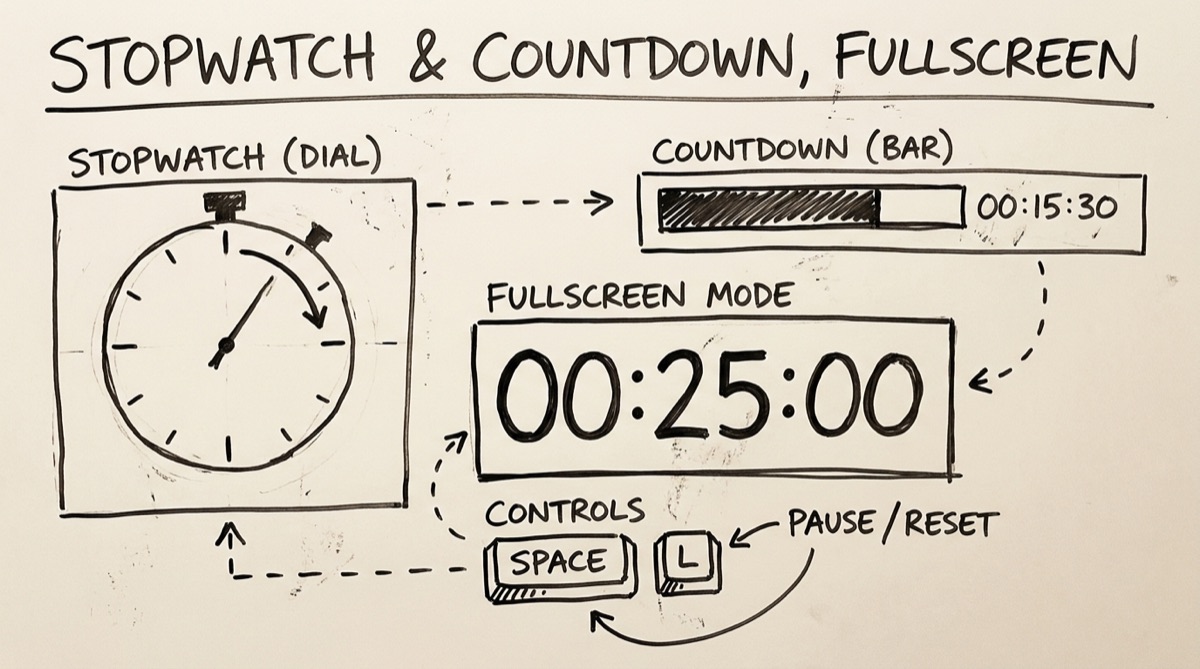
Most "online stopwatch" search results solve this badly — tiny digits buried in ad units, mouse-only controls, or countdown-only tools that can't also do lap splits. This post covers what a browser timer actually needs to get right, then walks through orangebot.ai/tools/stopwatch (nickname: the Chronograph), an ad-free stopwatch-and-timer built for exactly this.
What a Good Browser Timer Actually Needs
Four things separate a timer you can trust from one you'll fight with mid-task:
- Fullscreen readability from across the room. A stopwatch on a laptop screen is useless to a room of 30 exam-takers or a gym floor. Fullscreen mode needs to blow the digits up to something legible from 20+ feet, and it needs to strip everything else — nav bars, ads, chrome — down to just the number and a status dot.
- Keyboard control. If you're running a set, presenting, or proctoring, you don't have a free hand for precise mouse clicks. Space to start/pause, a single key for laps, a single key for reset — muscle memory should work without looking at the screen.
- Lap splits that actually help you. A raw list of times isn't useful mid-workout. You want to see the split (time since the last lap) next to the running total, and you want the best and worst splits called out automatically so you don't have to do the math yourself while gasping for air.
- Not losing accuracy when the tab isn't focused. This is the one almost nobody gets right, and it's worth explaining why.
The Background-Tab Problem
Browsers throttle JavaScript timers in inactive tabs. setInterval and setTimeout get capped to firing roughly once a second (sometimes less) once a tab is backgrounded or the window is minimized — this is deliberate, documented Chrome/Firefox behavior meant to save battery, not a bug. A stopwatch built by counting setInterval ticks (i.e., "add 10ms every time this callback fires") will silently fall behind the moment you switch tabs to check Slack, because the ticks it expected to get simply didn't happen.
The fix is to never count ticks. Orangebot's Chronograph stores a start timestamp from performance.now() and computes elapsed time as base + (now - start) on every frame via requestAnimationFrame. requestAnimationFrame itself pauses entirely in a hidden tab (browsers don't even bother throttling it — they just stop calling it), so the on-screen digits freeze while you're away. But the moment the tab regains focus and the loop resumes, it recomputes from the real timestamp delta instead of a tick count — so the number you see is correct, not drifted. You lose the animation while backgrounded; you don't lose the accuracy.
Concrete Use Cases
- Pomodoro-style focus blocks. The timer ships a 25-minute preset labeled as a "Pomodoro focus block" recipe alongside a 5-minute break, so the two halves of the cycle are one click each instead of typing minutes twice per session.
- HIIT and interval training. Worth being precise here: this is a single stopwatch and a single countdown, not an automated multi-round interval trainer — it won't cycle "30s work / 15s rest" on a loop for you. What it's good for is logging real round times: run the stopwatch through a full workout and hit Lap at the end of each round to get a table of splits, or use a preset countdown per round and manually reset between them.
- Public speaking and rehearsal. Set a countdown for your target length, go fullscreen, and put the laptop where you can see it without breaking eye contact with the room. The three-pulse audible alarm at zero (Web Audio, 880Hz) tells you time's up even if you're not looking at the screen.
- Standups and huddles. The 15-minute "standup/huddle" recipe and the visible progress bar make it easy to keep a meeting honest without anyone needing to own the timekeeping.
- Classroom exams and timed drills. Fullscreen mode plus large tabular-number digits are legible from the back of a room; hours/minutes/seconds/centiseconds each get their own labeled column so nobody has to squint to parse the format.
- Lab work and coding experiments. When you need to know exactly how long a manual step took — a reaction, a build, a benchmark run watched by eye — millisecond-scale lap splits beat eyeballing a phone clock.
How to Use the Chronograph
- Open orangebot.ai/tools/stopwatch and pick a mode from the bar at the top: Stopwatch (01) or Timer (02). You can also switch with the
1and2keys at any time. - For the stopwatch: hit Start (or press Space) to begin. Press
Lto log a lap without stopping the clock — each row in the side table shows the split since the last lap and the running total, with the fastest and slowest splits auto-tagged once you have two or more. PressR(or click Reset) to zero everything, including the lap table. - For the timer: pick one of the eight presets (1, 3, 5, 10, 15, 25, 30, or 60 minutes), type a custom minute/second value, or tap one of the four recipes (Pomodoro block, short break, standup, tea/plank). Press Space to start; the progress bar fills as time burns down, and you get an audible three-pulse alarm plus a flashing "TIME'S UP" readout when it hits zero.
- Go fullscreen by clicking the fullscreen icon or pressing
F. The display scales up to fill the screen with just the current mode's status and the digits — exit withEscor the on-screen exit button. - Nothing to save or export mid-session — laps and timer settings live in the browser tab's memory only. If you need the numbers afterward, write them down or screenshot the table before you refresh; there's no account and nothing is sent anywhere, so there's also nothing to log back into later.
Honest Comparison: What Else Is Out There
The category is old and crowded — most of what ranks for "online stopwatch" predates the current wave of client-side web tools, and it shows.
online-stopwatch.com is the category's oldest and largest player, with a sprawling catalog (chess clocks, race timers, classroom timers, video-background countdowns) going back to the Flash era. It works and it's free, but the UI hasn't modernized much and the ad load is heavy — you'll see banner units around the timer even in "fullscreen" views.
vClock is cleaner and has a genuinely useful feature the Chronograph doesn't: it auto-saves your stopwatch value and lap list to your browser so they survive a tab close. The tradeoff is the usual one for a free ad-supported site — display ads around the timer, and the appearance/settings customization lives behind more clicks than a single-purpose tool needs.
fullscreencountdowntimer.com and Big Timer are dedicated fullscreen countdown tools built specifically for presentations and workshops — no stopwatch, no laps, just a clean countdown. If all you need is a countdown for a talk, either is a reasonable single-purpose pick.
alphakevin.github.io/fullscreen-timer is a small open-source project with the same keyboard-first instinct as the Chronograph — F for fullscreen, S to switch stopwatch/countdown, R to reset — but it's a minimal personal project without presets, recipes, or lap statistics.
The honest takeaway: if you want your stopwatch value to persist after closing the tab, vClock does that and the Chronograph doesn't. If you want a countdown-only tool for a single presentation, the dedicated fullscreen-countdown sites are lighter-weight. But if you want one page that does precision stopwatch-with-laps and countdown-with-presets and fullscreen and keyboard control and doesn't run an ad next to your exam clock, orangebot.ai/tools/stopwatch is built for that specific combination — free, no sign-up, and nothing leaves your browser.
FAQ
Does the timer stay accurate if I switch tabs or minimize the window?
Yes, in the sense that matters: the value is always calculated from a timestamp delta (performance.now()), not from counting how many timer callbacks fired. Browsers pause requestAnimationFrame entirely in hidden tabs, so the digits stop updating on screen while you're away, but the moment you switch back the display recalculates from the real elapsed time and jumps to the correct number — no accumulated drift.
Can I run repeating interval rounds, like a Tabata timer?
Not automatically. The Chronograph is one stopwatch and one countdown, not a multi-round interval sequencer — it won't cycle work/rest periods on a loop. For interval training, either run the stopwatch continuously and hit Lap at the end of each round to log split times, or set a countdown preset per round and restart it manually between rounds.
How precise is it, really?
The readout shows hundredths of a second (centiseconds), driven by performance.now(), which has sub-millisecond resolution in most browsers. Some privacy-hardened browser modes (Tor Browser, some Firefox privacy settings) deliberately round high-resolution timers to reduce fingerprinting — in those modes, precision can round to roughly 5ms instead of sub-millisecond. For everyday timing (workouts, presentations, exams) this is well beyond what matters.
Are my laps or timer settings saved anywhere?
No. Laps and the current timer configuration live in the page's memory for that session only — refreshing the page or closing the tab clears them, and nothing is sent to a server. If you need a permanent record, note the numbers down before you navigate away.
Does it work on mobile?
Yes — the controls are large touch targets that work on iOS Safari and Android Chrome, and fullscreen mode works the same way via the browser's native Fullscreen API.
Do I need an account or will it cost anything?
No. It's free, runs entirely in your browser, and there's no sign-up wall or ad unit inside the tool itself.
For more no-upload browser utilities, see the full tools directory. If you're coordinating a meeting across cities before you start the clock, scheduling across time zones covers that half of the problem, and if you need to capture the session itself rather than just time it, recording audio online for free is the companion piece.