You post a link on Twitter, send the same URL in your newsletter, and drop it in a LinkedIn comment. A week later you open GA4 to see which one actually drove signups, and the acquisition report shows one giant bucket: Direct / (none). All three channels, indistinguishable, merged into "someone typed your URL in or we have no idea." The traffic was real. The attribution just never existed, because none of those links carried a tag telling GA4 where they came from.
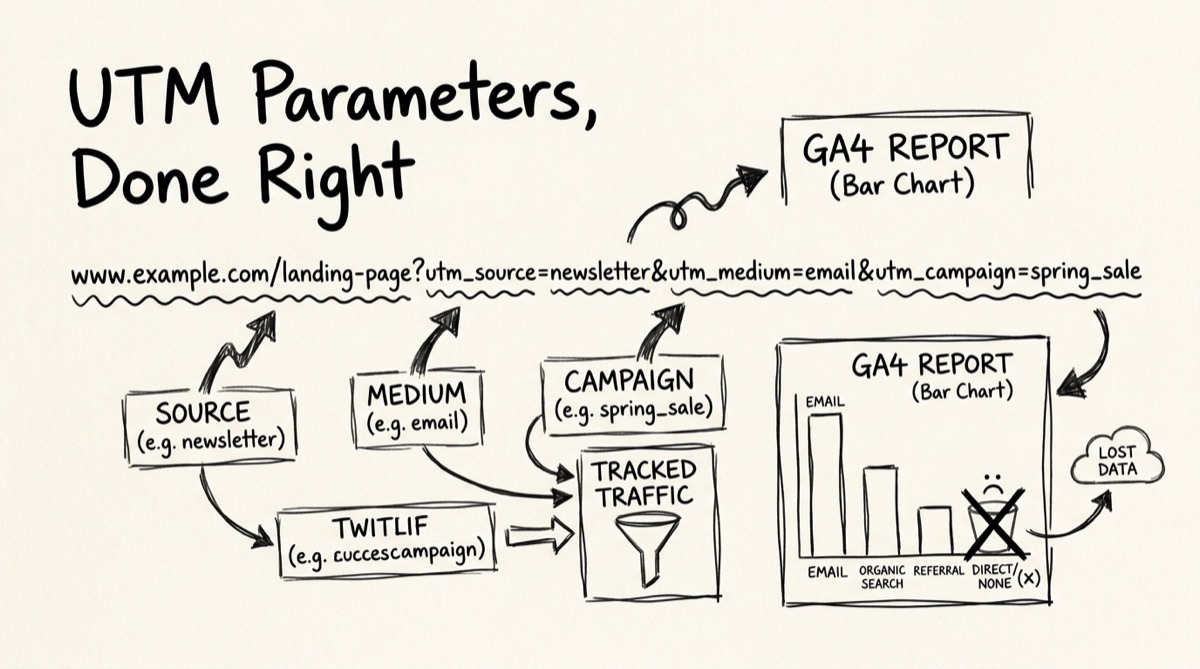
That's what UTM parameters fix. They're five query-string keys — utm_source, utm_medium, utm_campaign, utm_term, utm_content — appended to a URL that tell any analytics platform reading them exactly which channel, campaign, and asset sent the click. No UTMs, no attribution. This guide covers what each parameter actually does, the naming mistakes that quietly wreck reports, and how to tag links fast without a spreadsheet.
The five UTM parameters, and what belongs in each
UTMs are just URL query parameters. Append ?utm_source=newsletter&utm_medium=email&utm_campaign=launch-week to any URL and every major analytics platform — GA4, Plausible, Fathom, Matomo, Mixpanel — reads those exact key names and buckets the session accordingly. Get a key misspelled or miscased and the platform doesn't error; it just silently drops the session into "(not set)" or splits it into a second row. That's the trap: UTM mistakes don't fail loud, they fail invisible.
utm_source (required) — where the click came from. This is a specific referring entity: twitter, newsletter, google, reddit. Not a category — a name.
utm_medium (required) — what kind of channel it was. This is the category: social, email, cpc, referral, organic. Source and medium work together — newsletter + email tells you both who and how in one pair.
utm_campaign (required) — which specific push this link belongs to. launch-week, spring-sale-2026, q3-onboarding-drip. This is what lets you compare this month's launch against last month's, or one campaign's Twitter performance against its email performance, inside the same source/medium bucket.
utm_term (optional, mostly legacy) — originally built for paid search keyword tracking, back when Google Ads didn't auto-tag. Most Google Ads accounts now use valuetrack auto-tagging instead, so utm_term rarely gets manually set anymore outside of older paid-search workflows.
utm_content (optional) — differentiates near-identical links pointing at the same destination through the same source/medium/campaign. Two CTA buttons on the same landing page, or two ad variants in the same test: header-cta vs footer-cta, variant-a vs variant-b.
In GA4 specifically, source and medium drive the session default channel grouping — the dimension that rolls traffic into buckets like "Organic Social," "Email," or "Paid Search" in the standard Acquisition reports. If your medium value doesn't match one of GA4's expected patterns (promo instead of email, say), the session still gets tagged, but it may land in an "Unassigned" bucket instead of the clean channel group you expected — another reason to stick to conventional medium values instead of inventing your own vocabulary per campaign.
Naming conventions: the mistakes that split your reports
UTM values are case-sensitive strings, not semantic labels. GA4 treats Newsletter and newsletter as two separate rows. It doesn't merge them, doesn't warn you, doesn't offer a "did you mean" — it just quietly halves your newsletter numbers across two lines until someone notices the report looks wrong and goes digging.
| Rule | Wrong | Right | Why |
|---|---|---|---|
| Always lowercase | Twitter, NEWSLETTER | twitter, newsletter | Case-sensitive matching splits one campaign into multiple report rows |
| Hyphens, not spaces | launch week | launch-week | Spaces get percent-encoded (%20) in the URL — ugly and inconsistent across tools |
| Consistent vocabulary | tw, twitter, x for the same platform | twitter every time | Three names for one source = three rows instead of one |
| Consistent medium set | promo, paidsocial, ppc used interchangeably | social, cpc, email — pick a fixed list | GA4's default channel grouping expects conventional medium values |
| Never tag internal links | Homepage nav link carrying utm_source=homepage | No UTMs on same-site navigation | Overwrites the visitor's original session source — you lose their real acquisition channel |
| No PII in content/term | [email protected] | utm_content=header-cta | UTM strings get logged in browser history, referrer headers, and analytics exports — they're not private |
The internal-link rule trips people up the most. If a visitor arrives via a Google Ads click (utm_source=google&utm_medium=cpc) and then clicks an internal banner that itself carries utm_source=homepage-banner, most analytics setups will overwrite that visitor's session attribution to "homepage-banner," burying the fact they came from a paid ad. UTMs are for links pointing into your site from somewhere else — never for navigation within it.
How to build tagged links with orangebot's UTM Generator
orangebot.ai/tools/utm-generator is built for the common case: you have one destination URL and one campaign, and you need it tagged consistently across every channel you're posting it to — without retyping utm_source and utm_medium by hand seventeen times or maintaining a spreadsheet.
- Paste your destination URL. Drop in the page you want traffic to land on — a landing page, a blog post, your pricing page. You don't need the
https://prefix; the tool adds it automatically if you leave it off. - Type your campaign name. One value —
launch-day,q3-newsletter— applied asutm_campaignacross every generated link, so the whole push rolls up under one name in your reports. - Scan the generated list. The tool instantly produces a full set of pre-tagged links for the platforms you're actually likely to post to: Google (organic), Google Ads (cpc), Bing, Newsletter/email, Reddit, Twitter/X, LinkedIn, Facebook, Hacker News, Product Hunt, Instagram, TikTok, Pinterest, YouTube, GitHub, Discord, and Quora — each with the correct
utm_source/utm_mediumpair already set (newsletter+email,reddit+social,google+cpcfor the Ads-specific link, and so on), so you're not the one deciding whether Instagram's medium should besocialorpaidsocialthis week. - Copy the one you need. Click the copy icon next to any platform's link — it's copied instantly, no page reload, no extra confirmation dialog.
Because the source/medium pairs are baked in per platform, there's no field for typing a custom utm_source or utm_medium by hand — that's the tradeoff for speed. If you need a non-standard source (say, a specific podcast sponsor read instead of "Twitter"), take the plain URL and tag it manually, or use one of the closest platform rows as a starting template and edit the query string after copying. Nothing runs server-side: the URL you paste and the links it generates never leave your browser — open orangebot.ai/tools/utm-generator directly to try it against your own campaign.
Orangebot's builder vs. the alternatives
Google's Campaign URL Builder is the reference implementation — free, official, and it's what most of the "UTM best practices" guides link to. It builds one URL at a time from five fields (source, medium, campaign, term, content), which is exactly right when you're tagging a single link for a single channel. It has no memory between sessions and no way to fan a URL out across multiple platforms at once — you re-enter source and medium every time.
Spreadsheet templates (the classic UTM.io / Funnel-style approach) are what teams reach for once they need to enforce a shared naming convention across multiple people — a master list of approved values that a team can audit. But they're manual: you're still copy-pasting into a formula cell, and nothing stops a teammate from typing Newsletter where the sheet says newsletter.
Dedicated SaaS builders like UTM.io add team permissions, saved presets, and validation rules on top of the basic pattern — useful at agency or multi-brand scale, but overkill (and often paywalled past a handful of links) for a single marketer tagging campaign URLs.
Orangebot's UTM Generator trades the single-URL flexibility of Google's tool for speed on the specific, extremely common job of "I have one link and I'm posting it everywhere this week." One URL, one campaign name, and you get a full battery of correctly-tagged, ready-to-copy links for the platforms you're actually going to use — no sign-up, no spreadsheet, nothing uploaded. If you need a fully custom source/medium/term/content combination for a single channel, Google's builder or a manual query string is still the right call; if you're fanning one launch link across social, email, and a few communities, this is faster.
FAQ
Do I need UTM parameters if GA4 already has automatic channel grouping?
Automatic grouping only works reliably for referrer-detectable traffic — a click on google.com or facebook.com where the referrer header survives. It can't detect traffic from email clients, in-app browsers, Slack, Discord, or any link someone copy-pastes rather than clicks through. UTMs remove the guesswork for exactly those channels.
Why does GA4 show my tagged traffic as "(not set)"?
Usually a missing or misspelled required parameter — utm_medium left blank while utm_source is present, or a typo in the key itself (utm_medim instead of utm_medium). GA4 needs source, medium, and campaign present and spelled exactly right; a missing piece falls back to "(not set)" instead of erroring.
Should I put UTMs on links inside my own website?
No. Tagging an internal nav link or in-app banner overwrites the visitor's original acquisition source the moment they click it, destroying the attribution data you're trying to protect. Keep UTMs strictly on outbound-facing links: social posts, emails, ads, partner placements.
What's the difference between utm_medium and utm_source?
Source is the specific referrer (twitter, newsletter, google); medium is the category it belongs to (social, email, cpc). Multiple sources can share a medium — reddit, twitter, and linkedin are all medium=social — letting you roll up "all social traffic" while still drilling into which platform won.
Can I track individual ad variants with UTMs?
Yes — that's what utm_content is for. Keep source, medium, and campaign identical across variants and vary only content (variant-a vs variant-b). That isolates the variable you're testing while everything else stays grouped under one campaign.
Does a UTM-tagged link change what the visitor sees?
No. UTMs are read by analytics scripts on page load; they don't affect content or routing unless you've built logic that reads the query string. The visitor sees the same page — the URL is just longer.
For more of orangebot's free browser tools, see the full tools directory. If you're building out a shareable link kit alongside your UTM links, QR codes that never expire cover the physical/offline half of the same distribution problem, and if you're sharing traction numbers alongside your launch links, the App Stats Card Generator turns downloads and revenue into a shareable image.