An unfamiliar IP shows up in your auth logs at 3 AM. A scraper is hammering your API from an address you don't recognize. Someone on your team swears their VPN is routing through Germany and the app keeps serving them English pricing anyway. The first move is always the same: look up the IP. The catch is that "look up the IP" returns two very different kinds of answer — one you can trust and act on, and one that's a rough guess dressed up as a fact.
🌐 Looking to look up an IP address right now? Jump straight to the free in-browser IP Address Lookup Tool (/tools/ip-lookup) →. Resolves any IPv4 or IPv6 address to ASN, ISP, country, and geolocation in real time — zero server logs and no sign-up required.
What an IP Can and Can't Tell You
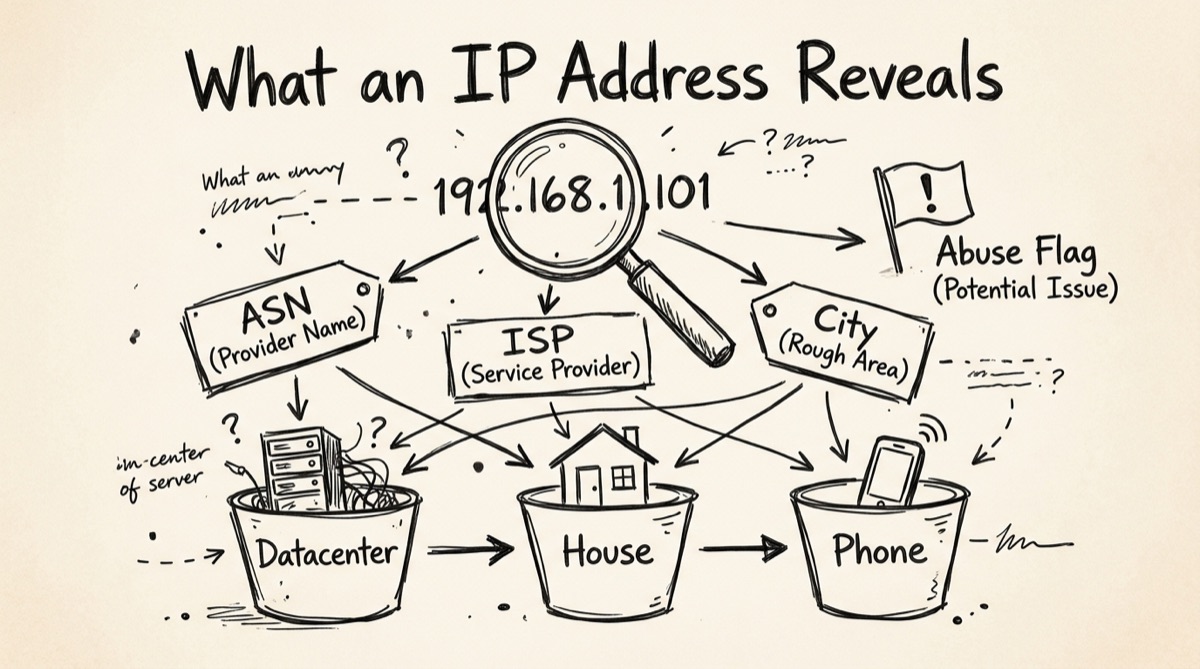
Every public IP address is registered to a network operator through a Regional Internet Registry (ARIN, RIPE, APNIC, LACNIC, AFRINIC). That registration is a matter of record, not inference — who leased the address block, full stop. Two other data points ride along with it and are nearly as solid: the Autonomous System Number (ASN) and the organization name.
Reliable, close to ground truth:
- ASN and network owner. An IP either belongs to Google's AS15169 or it doesn't — looked up from routing tables and registry data, not estimated.
- Country. IP blocks are allocated per region by the RIRs, and ISPs rarely route traffic across borders. Country accuracy is routinely reported in the high 90s percent.
- Datacenter vs. consumer ISP. Falls out of the ASN and organization type — one of the more dependable signals a lookup gives.
Approximate, sometimes wrong by a lot:
- City and coordinates. Built from registry records, routing data, and crowdsourced Wi-Fi/IP correlation. City-level accuracy commonly lands in the 50–80% range, worse for mobile carriers, which route through a handful of regional gateways — a phone can show up 200+ miles off.
- Timezone. Usually derived from the city guess, so it inherits the same error.
The practical rule: treat ASN, org name, and country as facts; treat city, coordinates, and timezone as a starting hint. Never gate a security decision — blocking a login, flagging fraud, enforcing geo-restrictions — on city-level geolocation alone. It's a good triage signal, a bad sole source of truth.
Reading an ASN: Datacenter, Residential, or Mobile
The ASN is the single most useful field in an IP lookup once you know how to read it, because it tells you what kind of network the traffic is coming from — usually more actionable than where it's coming from.
- Datacenter ASNs (AWS, Google Cloud, Azure, DigitalOcean, Hetzner, OVH) mean the request comes from a server, not a person's device. Legitimate: your own infrastructure, monitoring, webhooks, CDNs. Illegitimate: scrapers, credential-stuffing bots, API abuse. If your product has no reason to be used from a server, datacenter traffic on a consumer-facing endpoint is worth a second look.
- Residential ISP ASNs (Comcast, AT&T, Deutsche Telekom, NTT, regional cable/fiber providers) mean the request very likely comes from an actual home connection — the baseline "normal" for consumer traffic.
- Mobile carrier ASNs (Verizon Wireless, T-Mobile, Vodafone, China Mobile) come from cellular networks. Expect wide geolocation error — carriers use large regional gateway pools — and expect shared IPs, since carrier-grade NAT puts many phones behind one public IP. Don't rate-limit by IP alone on mobile-heavy traffic; you'll catch innocent users sharing that NAT.
- VPN/hosting-adjacent ASNs (Mullvad, NordVPN's exit infrastructure, or datacenter ranges known to run VPN endpoints) are a middle category — technically datacenter-owned but used to relay real people's traffic. Datacenter classification alone won't distinguish "VPN exit" from "abusive scraper" — that needs a reputation or VPN-detection dataset, a more specialized source than a basic geo/ASN lookup.
Why this matters for bot detection: a single IP's classification is one of the cheapest, fastest filters you can apply before anything more expensive like device fingerprinting or behavioral analysis. It's a first-pass filter, not a verdict — legitimate traffic comes from datacenters constantly (API integrations, CI runners, other companies' backends).
Practical Workflows
Log triage. Scanning auth logs for a suspicious login, pull the IP, run the lookup, and ask three questions: Is the ASN a datacenter? Is the country inconsistent with the account's usual pattern? Does the org name match expectations (home broadband vs. a hosting company you've never heard of)? Any one flips a routine login into "worth a closer look" — none alone is proof of compromise.
Checking a scraper's origin. Your API is getting hit at a rate no human session would produce. Look up a sample of source IPs. Clustering on a handful of datacenter ASNs spread across unrelated countries points to a distributed scraping operation renting cheap cloud instances. Residential ISPs spread across one country instead points to a botnet of infected consumer devices — which needs per-account rate limiting, not a blanket per-IP block.
Verifying a VPN exit. Before trusting a "we're testing from Germany" bug report, or auditing your own VPN's advertised exit, look up the IP the connection actually presents. Country and ASN should match the claimed exit — a datacenter ASN in an unexpected country means the VPN is misrouting or the exit list is stale. It's also the fastest way to confirm a VPN is working: query your own IP before and after connecting, diff the ASN and country.
How to Look Up an IP with OrangeBot
orangebot.ai/tools/ip-lookup is a free, no-signup IP lookup — it loads with your own current IP already resolved, and you can query any other address from the same box.
- Go to orangebot.ai/tools/ip-lookup — on load it auto-detects and displays your own public IP, a quick "am I connected the way I think I am" check.
- To look up a different address, type an IPv4 address (e.g.
8.8.8.8) into the field and hit search. - Read the result block: country, region, city, latitude/longitude, timezone, and a network/provider line — the organization name registered to that IP block, falling back to the raw ASN number if no company name is on file, so you get the ISP or hosting company at a glance without a separate lookup.
- Cross-reference: a cloud-host name (DigitalOcean, OVH, Hetzner, AWS) means treat it as datacenter per the reading guide above; a telecom name means trust the country, treat the city as approximate.
Because the lookup runs as a fetch straight from your browser to the geolocation API, orangebot.ai's servers never see which IP you queried. Worth being precise about, though: the upstream geolocation provider itself sees the query, same as any lookup tool, free or paid. "Client-side" means no middleman logging on our end — not that the query is invisible to everyone.
CLI Sidebar: whois and dig -x
If you live in a terminal, two commands cover most of what a browser lookup gives, plus one thing it can't: reverse DNS.
# Registry data: who owns the block, abuse contact, allocation date
whois 8.8.8.8

# Reverse DNS: does this IP resolve to a hostname?
dig -x 8.8.8.8 +short
# → dns.google.
whois reliably includes the ASN, organization, address block (CIDR), and often an abuse-contact email — useful for reporting something, not just triaging it. dig -x (reverse DNS) is worth running alongside any geo/ASN lookup: legitimate datacenter tenants and CDNs almost always have a clean PTR hostname (ec2-x-x-x-x.compute-1.amazonaws.com, googlebot.com); no PTR record at all is a mild extra signal toward "not a well-behaved service."
Honest Comparison: What to Use When
- ipinfo.io — developer-grade. Deep API with VPN/proxy/hosting detection, abuse-contact data, and confidence-scored geolocation. Free tier is metered; the good data (privacy detection, precise company data) sits behind paid plans. Right tool if you're building lookups into a product, not a one-off check.
- AbuseIPDB — the actual abuse-reputation source. Community-reported confidence scores for whether an IP has been seen attacking, spamming, or scanning. If your real question is "has this IP misbehaved before," this is the tool — no basic IP lookup tool, including ours, replaces a dedicated reputation database.
- whatismyipaddress.com / BrowserLeaks — consumer-facing, ad-heavy; BrowserLeaks throws in a pile of extra browser-fingerprinting data (TCP/IP stack, HTTP headers, TLS) beyond plain IP geo, more than most people asking "what's my IP" want.
whois/ RDAP — ground-truth registry data with none of the packaging. No UI, no map, just the raw allocation record. Best for an abuse contact or exact CIDR block, worst for a fast visual read.- orangebot.ai/tools/ip-lookup — the quick, no-signup, all-in-one view: your own IP on load, single-query lookups for any other IPv4 address, geo plus network owner on one screen, no ads, no account. It doesn't try to be an abuse-reputation database or VPN-detection API — pair it with AbuseIPDB or ipinfo.io for that. For "who owns this IP and roughly where does it sit," it's the fastest path from question to answer.
FAQ
How accurate is IP geolocation, really?
Country-level accuracy is reliably high, commonly reported in the high 90s percent. City-level is much softer, typically 50–80%, worse for mobile carriers, which route through regional gateways rather than the user's actual location. Treat city and coordinates as a hint, not a fact.
What's the difference between an ASN and an ISP?
An ISP is the company; an ASN is the unique routing identifier that company (or any network operator) announces to the internet's backbone. One ISP can hold multiple ASNs, and one ASN can serve multiple brands. "AS15169" is Google's routing identity, independent of which Google service the traffic is destined for.
Can I tell if an IP is a VPN or proxy from a basic lookup?
Not reliably. A datacenter ASN is a precondition for being a VPN exit, not proof of it — plenty of datacenter IPs are just servers. Confirming VPN/proxy status needs a dataset built for that (ipinfo.io's privacy detection, dedicated VPN-range lists), not a general geolocation lookup.
Why does my own IP show the wrong city?
Your ISP allocated your address from a regional pool mapped to a hub city — often where it has a routing or peering point — rather than your street address. Normal, not a bug, and how ISPs manage address blocks.
Does IP geolocation work the same for IPv6?
Registry and ASN data works the same way for both, though IPv6 geolocation databases tend to have less mature coverage simply because IPv6 traffic volume and address-block churn are newer. The OrangeBot tool above currently accepts IPv4 addresses.
Is querying an IP lookup tool itself a privacy risk?
Only in that whichever service resolves your query sees the IP you asked about, same as a search engine sees your search terms. Looking up your own IP is low-stakes; investigating something sensitive is where it's worth knowing some providers log queries.
For more free, no-signup browser utilities, see the full tools directory. For the same privacy-first evaluation approach applied more broadly, see AI tools for developers in 2026; for the same philosophy applied to two-factor codes, see running a TOTP authenticator entirely in your browser.