If you run Vite, webpack, or esbuild, your production JS and CSS are already minified — you don't need this post. But a lot of code never touches a bundler: an inline <style> block in an HTML email, a Tampermonkey userscript, a snippet pasted into a Shopify theme editor. That code stays exactly as verbose as you typed it, forever, unless you minify it by hand.
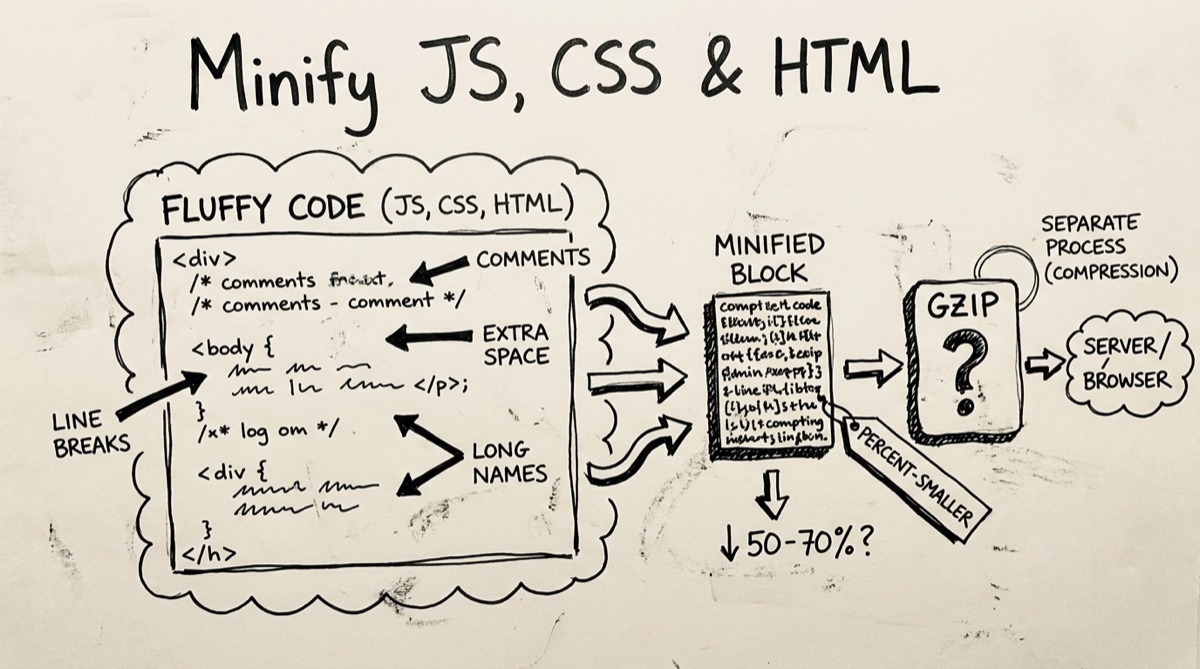
What Minification Actually Removes
"Minify" gets used loosely. There are really three separate things a minifier can do, and they save very different amounts:
- Whitespace, newlines, and indentation. Pure formatting — the parser never needed it. This is the biggest and safest win, and it's what every minifier does first: strip comments, collapse runs of spaces, drop line breaks, tighten spacing around punctuation.
- Identifier renaming. Turning
calculateShippingTotalintoa. This is where the largest JS savings live on real codebases, because verbose variable and function names are pure text bulk. It requires actually parsing the code into an AST (abstract syntax tree) to know which names are safe to rename — you can't regex your way to this without breaking things. - Dead-code elimination. Removing unreachable branches, unused exports, and — with a bundler in the loop — entire modules nothing imports (tree-shaking). This needs to understand your whole dependency graph, not just one file.
Here's the part that matters for deciding whether you need a tool at all: if you already run a modern bundler, it's doing all three for you at build time. Vite and esbuild ship a built-in minifier that renames identifiers and strips dead code automatically in production builds. Webpack does the same via TerserPlugin, on by default in mode: 'production'. Rollup's official Terser plugin does it for library builds. Running your bundler's output through a second minifier is almost always redundant — you'd be re-stripping whitespace that's already gone.
Where minification tools earn their keep is code that a bundler never sees.
When an Online Minifier Still Makes Sense
A few concrete cases where there's no build step to lean on:
- HTML email. You hand-write or export HTML for Mailchimp, Klaviyo, or a transactional email service, with all your CSS inlined. There's no bundler — you paste raw markup into a send composer. Gmail clips any HTML email over roughly 102 KB and adds a "[Message clipped]" link, hiding everything below it (including your unsubscribe footer, which email-compliance rules require to stay visible). Stripping whitespace and comments from inlined CSS is often the difference between clipped and not.
- CMS and page-builder snippets. Custom code blocks in WordPress, Webflow, or a client's page builder — pasted directly into a "custom HTML/CSS/JS" field, no compilation involved.
- Userscripts and browser extensions. A Tampermonkey or Greasemonkey script is one flat
.jsfile with no build pipeline. Same for a quick content script you're distributing as raw text. - One-off embeds. A chat widget snippet, a tracking pixel, a
<script>tag someone asked you to drop straight into<head>— small, standalone, never bundled.
If your code lives in any of these buckets, a paste-box minifier is the right tool. If it lives in src/ and goes through npm run build, it isn't.
Minify vs. Gzip/Brotli: Don't Double-Count the Savings
This is the most common mistake in "why minify" articles: treating minification and transfer compression as additive, stacking two separate 60–70% reduction numbers into one imaginary 90%+ total. They overlap heavily.
Gzip and Brotli are extremely good at compressing repeated patterns — and whitespace, repeated indentation, and long identifier names are exactly that: highly repetitive text. Run gzip on an unminified JS file and you'll typically already see 60–70% reduction, because the compressor is implicitly doing a lot of what a whitespace-stripping minifier does. Minify first, then gzip, and the marginal extra bytes saved over gzip-alone are often modest — usually in the 5–15% range on top, not another 60%.
So why minify at all if a server already compresses responses? Two real reasons:
- Parse and compile time. The browser decompresses the response, then has to parse and compile the full, decompressed JavaScript before it can run — gzip doesn't shrink that step. Fewer bytes and fewer tokens means less main-thread work before your code executes, which matters more than transfer size on mobile CPUs.
- Contexts without compression. Inline
<script>and<style>blocks inside an HTML document, HTML emails, and some CMS/CDN edge cases don't always get compressed the way a separate.js/.cssfile does. There, minification is the only size reduction you get.
Practical rule: minify for parse time and for anything inline or uncompressed; rely on gzip/Brotli for transfer size on your actual bundled assets. Treat them as complementary, not stackable.
How to Minify Code with OrangeBot
- Open orangebot.ai/tools/code-minifier and pick the HTML, CSS, or JavaScript tab.
- Paste your code into the input box, or drag a
.html,.css, or.jsfile onto it — the tool auto-detects the right tab from the file extension. - Click Minify. You'll see input and output size in bytes/KB side by side, plus the percentage saved.
- Click Copy to grab the minified result, or keep editing and re-minify.
Everything runs as plain JavaScript in your browser tab — there's no upload, no server round-trip, nothing to wait on. That also means it's honest about what it's doing: it strips comments, collapses whitespace, and tightens spacing around punctuation and operators. It does not rename variables, eliminate dead code, or generate source maps — those require an actual AST parser (which is what Terser, csso, and similar libraries are for). For a standalone HTML/CSS/JS snippet, that's usually all the size reduction you need. For a real production JS bundle, you want your build tool's minifier, not a paste-box.
One honest caveat on the JS tab specifically: comment-stripping is regex-based, not parse-based, so it's built to be careful around :// in URLs but can still misfire on unusual string literals that happen to contain // or /* sequences. Test your minified output before shipping it, same as you would with any minifier.
Honest Comparison: Where Each Tool Wins
- minify-js.com — powered by Terser, the same AST-based minifier bundlers use. Real variable renaming, real compression ratios, handles modern ES syntax properly. Best pick if you specifically need JS-only, Terser-grade output and don't mind pasting into a third-party page.
- minifier.org — built on the MatthiasMullie\Minify PHP library, handles JS and CSS in one page with a solid test suite behind it.
- Toptal's CSS Minifier — CSS-only, simple, with an API if you want to script it.
- codebeautify.org and wordtohtml.net — combined HTML/CSS/JS minifiers aimed at non-developers; convenient, ad-supported, upload-based.
- HTML Minifier Next (the maintained successor to kangax's html-minifier) — the actual library several of the above tools wrap. Thorough, configurable, but it's a library, not a paste-and-go page.
- Your bundler — Vite/esbuild's built-in minifier, webpack's TerserPlugin, or PostCSS + cssnano/csso for CSS. If a build step already touches the file, this beats every online tool listed here, full stop.
Pick Terser-backed tools when you need maximum JS compression on a standalone script and don't mind the upload. Pick orangebot.ai/tools/code-minifier when the priority is speed and not pasting your code into someone else's server — a quick HTML-email cleanup, a CMS snippet, a userscript, anything you'd rather keep local. And skip online tools entirely the moment the code in question already goes through npm run build.
FAQ
Does minifying break my code?
Whitespace and comment stripping is safe — it doesn't change behavior. The riskier step is identifier renaming and dead-code elimination, which real minifiers (Terser, esbuild) handle carefully via full parsing. OrangeBot's minifier doesn't rename anything, so there's nothing to break on that front; it's a comment/whitespace pass, not a semantic transform.
Will this shrink my JS as much as Terser?
Less. Terser's biggest wins come from renaming long identifiers to single letters, which needs an AST parser to do safely. A whitespace/comment-only pass on typical hand-written JS usually saves noticeably less than a full Terser mangle — still worth doing for a standalone script, but don't expect bundler-grade ratios.
Why does minifying HTML email specifically matter?
Because Gmail clips messages over roughly 102 KB, hiding content (including your unsubscribe link) below the cut. Inlined CSS in email templates is often the biggest source of bloat, so stripping whitespace and comments there has an outsized, concrete payoff — it can be the difference between a clipped email and a clean one.
Should I minify before or after gzip/Brotli compression?
Minify first, then let your server or CDN gzip/Brotli the result on the wire — that's the standard order and it's what bundlers already do. Don't expect the two to stack multiplicatively; gzip alone already captures most of the whitespace-driven savings, so minification's extra marginal value is mostly about parse time, not transfer bytes.
Can I un-minify code back to its original form?
Not reliably without a source map, and OrangeBot's minifier doesn't generate one. Always keep your original, readable source file — treat the minified output as a build artifact, never the thing you edit next time.
Does the OrangeBot code minifier upload anything?
No. The minification logic runs as JavaScript inside your browser tab; your code never leaves your device. That's true of every tool in orangebot.ai/tools, and it's why we build them client-side by default rather than routing pastes through a server.
For related browser-based utilities, see how to format, validate, and diff JSON online or the broader roundup of AI tools for developers in 2026.