Your lender quotes you a monthly payment. It's a single number, presented with total confidence, and almost nobody asks where it comes from. It comes from one formula — the same one every bank, calculator, and spreadsheet template uses. Once you understand it, "how much house can I afford" stops being a black box and becomes arithmetic you can check yourself.
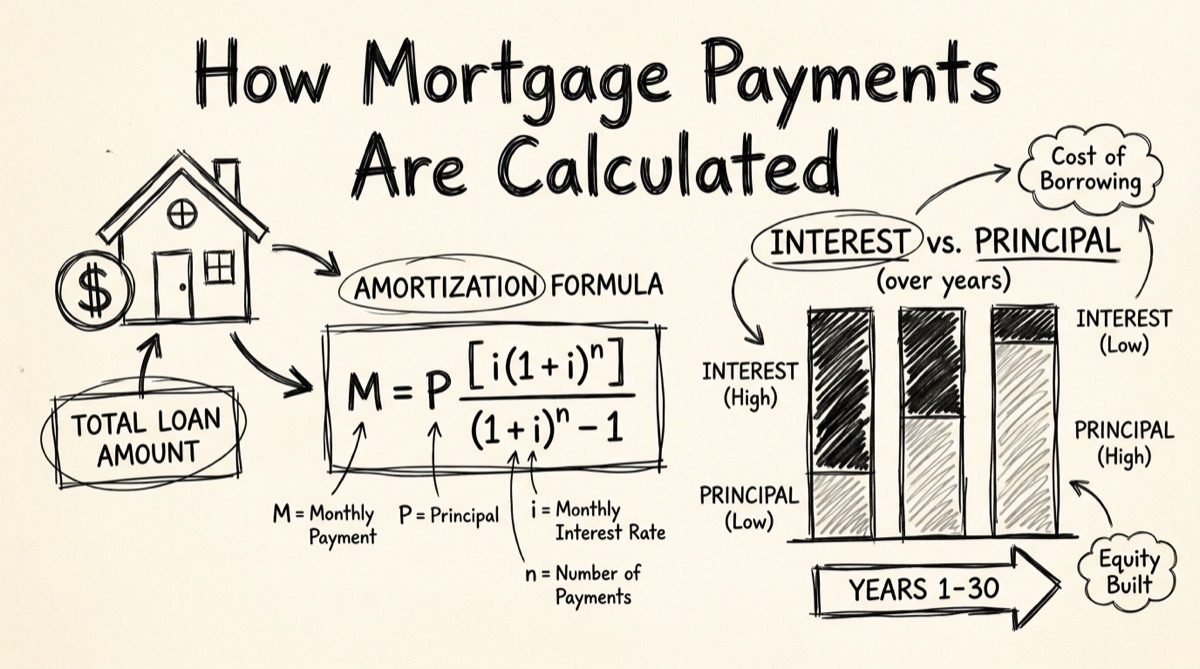
The Amortization Formula, Term by Term
Every fixed-rate mortgage payment comes from this equation:
M = P · r(1+r)ⁿ / ((1+r)ⁿ − 1)
- M — the monthly payment (what you're solving for).
- P — principal, the loan balance you're borrowing (home price minus down payment).
- r — the monthly interest rate. Your APR divided by 12. A 6% APR becomes r = 0.06 / 12 = 0.005.
- n — the number of monthly payments over the loan term. 30 years = 360. 15 years = 180.
The formula solves one problem: find a single payment amount, unchanged for the entire term, that exactly zeroes out the balance in n payments while charging interest only on what's still owed. (1+r)ⁿ appears twice because it's compounding the balance forward and computing what a level payment stream needs to be to offset that compounding.
This is "fixed monthly" amortization — the standard product. There's a second, less common method worth knowing: fixed principal, where you pay down the same principal amount every month (P/n) and let the interest — and therefore the total payment — shrink over time. The math is simpler (no exponent needed), but the payment isn't level, which is why almost nobody defaults to it.
A Fully Worked Example
Let's use clean numbers: a $400,000 loan, 6% APR, 30-year term.
-
Monthly rate: r = 0.06 / 12 = 0.005
-
Number of payments: n = 30 × 12 = 360
-
Compute (1+r)ⁿ = 1.005³⁶⁰ ≈ 6.0226
-
Plug into the formula:
M = 400,000 × 0.005 × 6.0226 / (6.0226 − 1) M = 12,045.20 / 5.0226 M ≈ $2,398.20
That's the number a lender would quote you. Now look at month one. The interest charged is simply the balance times the monthly rate:
- Interest, month 1: 400,000 × 0.005 = $2,000.00
- Principal, month 1: 2,398.20 − 2,000.00 = $398.20
Of your very first payment, 83% goes to interest and only 17% reduces the loan. Over the full 360 payments, total paid is 2,398.20 × 360 = $863,352. Subtract the original $400,000 principal and total interest paid over the life of the loan is $463,352 — more than the amount you borrowed.
Why Early Payments Are Almost All Interest
This isn't a scam or a bank trick — it's a direct consequence of interest being charged on the remaining balance every month. In month 1, the balance is at its highest ($400,000), so the interest charge is at its highest ($2,000). Because the total payment is fixed at $2,398.20, whatever's left after interest is what goes to principal — and early on, that's not much.
As months pass, principal payments (even small ones) chip away at the balance, which shrinks the next month's interest charge, which leaves a little more of the fixed payment for principal — a feedback loop that accelerates over the loan's life. The crossover point where a payment becomes more principal than interest happens well before the halfway mark in time but well after the halfway mark in dollars paid — which is exactly why refinancing or selling in years 3–7 leaves you with far less equity than intuition suggests.
PITI: What This Formula Doesn't Include
The M in that formula is principal and interest only. Your actual monthly housing cost — what lenders call PITI — adds three more line items the amortization formula has no opinion on:
- Property Taxes — set by your county/municipality, typically billed annually or semi-annually and escrowed monthly by your lender.
- Homeowners Insurance — a policy premium, also usually escrowed monthly.
- PMI (Private Mortgage Insurance) — required by most conventional lenders when your down payment is under 20%, protecting the lender (not you) against default. It typically drops off once you reach 20–22% equity.
- HOA dues, if the property has one — not escrowed by the lender, but a real recurring cost affecting affordability the same way.
None of these have a universal formula the way P&I does — they depend on your specific municipality, insurer, and loan program. A calculator that shows a confident all-in PITI number is making assumptions about your tax rate and premium that may not match your actual mortgage. That's a deliberate scope decision here: the mortgage calculator computes the part of your payment with an exact formula, and leaves the rest to your actual tax bill and insurance quote rather than a guessed number dressed up to look precise.
How Extra Principal Payments Change Total Interest
Because interest is recalculated every month against whatever balance remains, any extra dollar applied to principal today stops accruing interest for every remaining month of the loan — no special account, just a smaller balance feeding next month's interest calculation.
Three distinct levers do this, and they behave differently:
- Recurring extra principal (e.g., an extra $200/month) compounds every month — the balance drops a little faster every period, so interest savings snowball for the rest of the term.
- A one-time lump sum removes interest on that chunk of principal for every month after the prepayment, but doesn't compound like a recurring extra payment — the earlier you make it, the more months of interest it removes.
- Shortening the term outright forces a higher required monthly payment but guarantees the interest savings, since fewer total payments means less total interest by construction.
The relative size of the savings depends entirely on your balance, rate, and months remaining — which is why a calculator that runs the real amortization month-by-month, rather than an approximation, matters. The mortgage calculator's Payoff Strategy panel runs all three against your actual numbers and reports interest saved, months saved, and the change in monthly payment side by side against baseline.
How to Use the Tool
- Enter loan balance, term, and rate. Loan Balance, Term (years), and Rate (APR) are the three required inputs — or click a preset example (Starter Home, Move-Up Home, Jumbo, 15yr Refi) to start from realistic numbers.
- Pick a payment method. Fixed Monthly is the standard product. Fixed Principal shows the alternative where principal is level and total payment declines over time.
- Read the baseline numbers. Monthly Payment, Total Interest, and Payoff Term update instantly as you type.
- Pick a Payoff Strategy to compare. Shorten Term, Extra Payment (monthly and/or annual), or Lump Sum — the tool runs a second amortization path against your inputs.
- Read the savings panel. Interest Saved, months paid off faster, and the change to your monthly payment appear side by side once a strategy is selected.
- Check the chart and yearly table. The Remaining Balance chart plots both paths over the life of the loan; the Yearly Schedule table breaks out principal, interest, and remaining balance for every year.
Everything runs client-side — nothing you type leaves your browser, because there's no server call to send it to.
Bank Calculators vs. a Calculator That Isn't Selling You Anything
Search "mortgage calculator" and results are dominated by lenders: Rocket Mortgage, Chase, LendingTree, Freedom Mortgage, and local bank sites like OakStar Bank. These are competent calculators — the amortization math is correct — but they exist to originate loans. Several sit behind or next to lead-capture forms, or nudge you toward a "get pre-qualified" flow that wants your name, income, and phone number before you've finished comparing scenarios.
There are honest neutral options too: calculator.net's amortization calculator is a solid, ad-supported utility with no lead capture, and Investopedia's explainer is a good reference for the formula itself. Neither, though, lets you compare a baseline against an extra-payment or lump-sum strategy side by side, and neither exposes the fixed-principal payment method as an alternative to level payments.
The mortgage calculator on orangebot.ai is built for the case those tools don't serve well: real numbers, payoff strategies compared without re-entering data twice, and no form to fill out to see the result. For the rest of orangebot's privacy-first calculators and converters, see the tools directory.
FAQ
Does the calculator include property taxes and insurance (PITI)?
No, deliberately. It computes principal and interest — the part of your payment with a fixed, universal formula. Taxes, insurance, and PMI depend on your municipality, insurer, and loan program, so any number a generic calculator shows for them is an assumption, not a fact. Get those from your county assessor and an actual insurance quote, then add them to the P&I number for a real PITI estimate.
What's the difference between Fixed Monthly and Fixed Principal payment methods?
Fixed Monthly keeps the total payment level for the whole term while the principal/interest split shifts. Fixed Principal keeps the principal portion level instead, so total payment is highest in month 1 and declines every month after — same total interest philosophy, different cash-flow shape.
How much does making an extra payment actually save?
It depends on your balance, rate, and months left — there's no universal percentage. A recurring monthly extra payment compounds longest and tends to save the most; a lump sum saves less the later you make it; shortening the term guarantees savings but raises the required payment. Run your real numbers through the Payoff Strategy comparison for the actual figures.
Should I choose a 15-year or 30-year term?
A 15-year term charges less total interest — fewer payments, faster amortization — but the required monthly payment is meaningfully higher. A 30-year term is cheaper monthly but roughly doubles or triples total interest over the loan's life. Model both with the same balance and rate to see the actual trade-off rather than relying on the rule of thumb.
Does this handle adjustable-rate mortgages (ARMs)?
Not directly — the formula and tool assume a fixed rate for the full term. For an ARM, calculate separate scenarios at your initial rate and at plausible post-adjustment rates; there's no way to model a rate that's contractually allowed to change without picking specific assumptions yourself.
Is my loan data stored or sent anywhere?
No. The schedule, chart, and comparisons are computed in your browser with JavaScript. Nothing about your loan balance, rate, or strategy choices is transmitted to a server.
If you're evaluating a HELOC instead of (or alongside) a first mortgage, how HELOC payments work covers the different draw-period and repayment-period math. If leverage and payoff math interests you generally, leverage, position size, and liquidation applies the same arithmetic honesty to margin trading.